.post img{ border: 1px solid #000000; padding: 1px; }

Thursday, February 28, 2019

Make Math Digital - and Accessible


One of the great new products we've launched recently is EquatIO - a math formula generator developed by Texthelp. This is the same company that makes such great products as Read-Write. Emporia State purchased the LTI integration component that allows EquatIO to be accessed directly from the Canvas Rich Text Editor (RTE). Note, EquatIO is only supported using Chrome at present. 

Here's how it works....

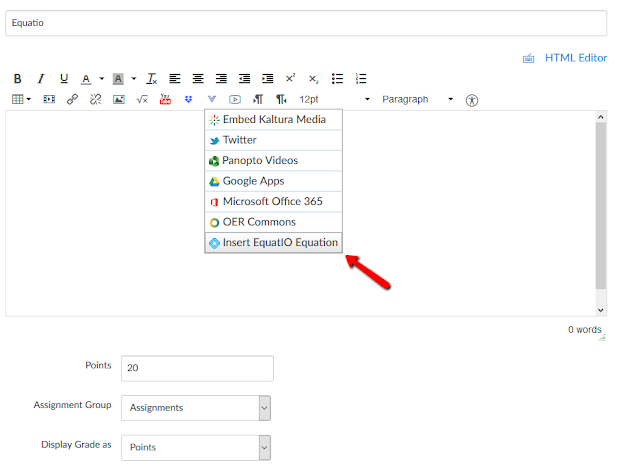
Step 1: Access EquatIO from inside Canvas. This is located wherever the RTE is provided. You will need to click the Chevron Tool (V) to locate EquatIO.


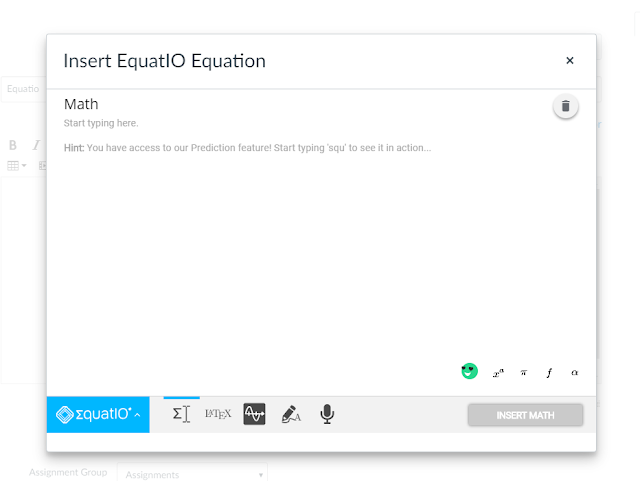
Step 2: Once the EquatIO editor opens, begin composing the equation. The options along the bottom include the Equation Editor, a LaTeX editor, a Graph Editor, a handwriting recognition tool, and a speech recognition tool. The handwriting recognition tool and the speech recognition tool will automatically create an accessible equation by simply writing or speaking.


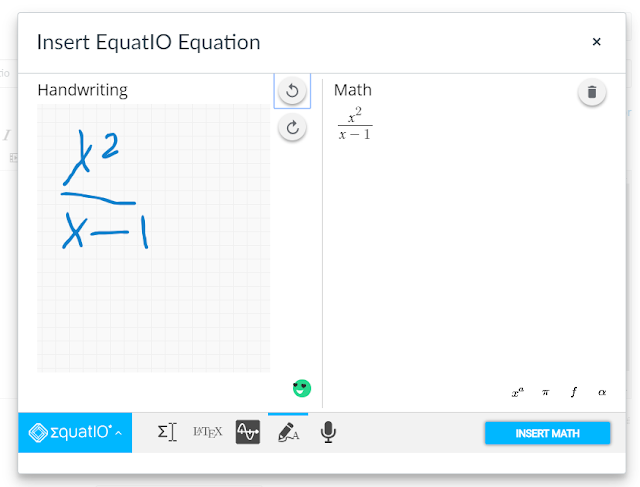
Step 2a: If you use the handwriting tool, the equation will automatically generate using artificial intelligence. The clearer the writing, the more accurate the equation. Below I'm using a mouse (not recommended). A stylus would yield better results.


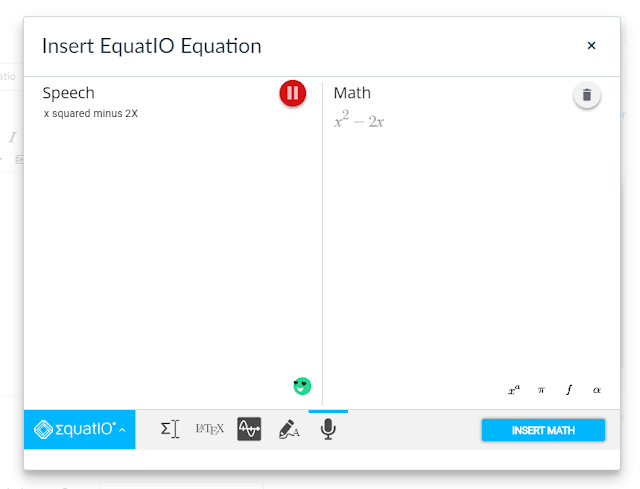
Step 2b: If you are using EquatiIO's speech input feature, simply speak into the microphone and the equation will generate automatically.


The beauty of EquatIO is that the equations are created in an accessible format that can be read by screen readers. No other math equation editor can match this product's ability to input equations using five different options - all of which provide content in a screen-reader friendly format.

To see EquatIO in action, check out the following video.


Saturday, February 16, 2019

Canvas Analytics Beta


One of the new features you may not even be aware of is called Analytics. It appears as a sidebar/navigation option in every Canvas course. This feature may currently be turned off or hidden, but you can easily activate it. Don't worry. If you enable this feature in the course sidebar, students won't see it. Moreover, this tool works even if the course has concluded.

Enable Analytics
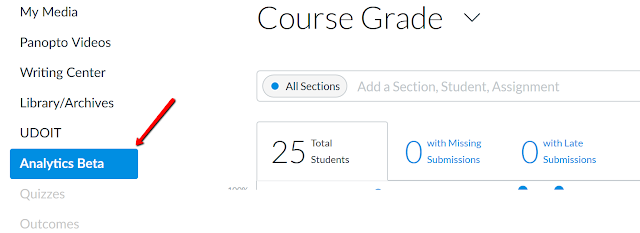
Step 1: From your Canvas course, open Settings > Navigation.
Step 2: Drag Analytics from the inactive to the active navigation menu. Arrange in the desired menu hierarchy. Click Save.

Note: It will appear as Analytics Beta since this is still in testing.

Grade Analytics Window

Open Analytics
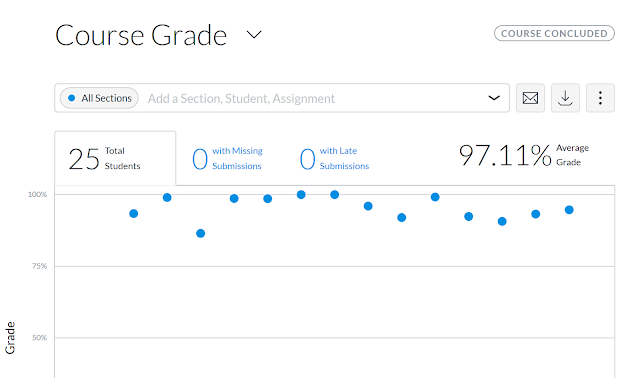
Click Analytics Beta on the course sidebar. In the topmost window you will see a grade distribution table. This data set appears automatically. You can choose from Data Shapes, Data Table, or both using the vertical ellipses button. Each dot, or shape, represents an aggregated grade distribution point. That data point might be an assignment, a discussion, or an exam. You can also select from three data tabs, including Missing Submissions and Late Submissions. The average course grade appears to the right.

Course Grade Distribution

View Datapoints
At the bottom of the table you will see icons illustrating what the data point represents.
Select the appropriate checkbox to see Assignments, Discussions, and/or Quizzes.


Assignment Discussions and Quizzes option

Comparing Student Data
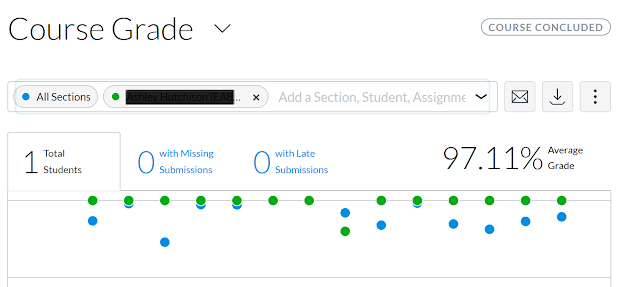
Using the drop-down arrow/chevron in the upper right, faculty can select one or more students to compare scores. In the image below, one student (name obscured) was selected to compare against the course averages (eg "All Sections") for each graded activity. That student's data points appear as green dots, whereas the entire course appears as blue dots.

Course Grade Data Points Distribution

Other Features
  • Faculty can download the data set using the download icon
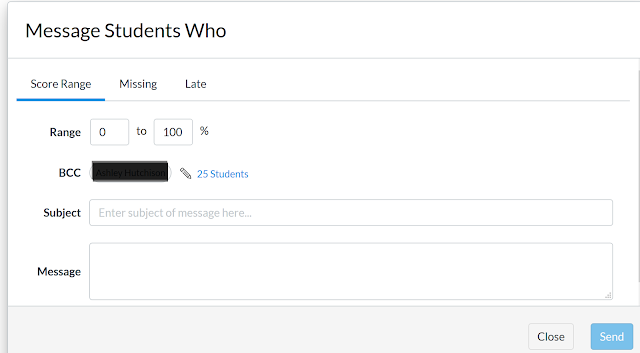
  • Faculty can also click the Email icon to Message Students Who. This allows them to contact students who have scores falling in a certain range (determined by the faculty), who have missing assignments, or have late assignments. (The student's name is obscured.)
Note: This feature blind copies each student.
Message Students Who Option


Thursday, February 14, 2019

Why Does Quality Matters Matter?


By now you've likely heard of Quality Matters. But what is it, where did it come from, and why is it important? First, a little background. 

 Where Did It Come From?

According to their web site, Quality Matters began with a small group of colleagues in the MarylandOnline (MOL) consortium who were trying to solve a problem among institutions: how do we measure and guarantee the quality of a course? This question was especially important as institutions began to create a system where they could share available seats in their online courses with other institutions. They needed a way to ensure course quality — that courses would be equivalent — for their students, regardless of where the course originated. In 2003, MOL outlined how the Quality Matters program could create a scalable process for course quality assurance, and applied for a Fund for the Improvement of Postsecondary Education (FIPSE) grant from the U.S. Department of Education.

Fast forward sixteen years and QM now partners with nearly 1,100 colleges, universities, and technical schools across the world - representing 11 countries. In the US, all 50 states plus the District of Columbia and Puerto Rico have subscribing institutions.

How Does It Work?

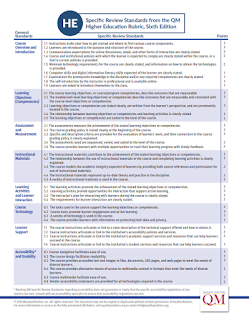
The QM review process is collegial. Qualified, experienced course reviewers work in teams of three to review courses based on eight general standards and 42 specific standards. The eight General Standards are as follows:
  1. Course Overview and Introduction
  2. Learning Objectives (Competencies)
  3. Assessment and Measurement
  4. Instructional Materials
  5. Learning Activities and Learner Interaction
  6. Course Technology
  7. Learner Support
  8. Accessibility and Usability
Twenty three of the 42 specific review standards are considered Essential and are scored at 3 points each. The reviewers must agree that the course meets all twenty three of these criteria. Twelve of the standards are considered Very Important and seven are considered Important for a total of 100 points. Collectively, a course must reach a score of 85 or 85% out of 100. Not every criterion must be met with the exception of the Essential Standards. A typical course review normally takes from 8 to 10 hours for each person. An interactive scorecard is used the gauge the course quality. Detailed annotations - or qualitative assurance indicators - are used to guide the reviewers during the process. Annotations explain the applications of the Standards and their inter-relationships.

https://www.qualitymatters.org/sites/default/files/PDFs/StandardsfromtheQMHigherEducationRubric.pdf
Quality Matters 6th Edition Rubric
Click for Larger View


Is This The Only Rubric?

There are actually several similar rubrics, including Blackboard’s Exemplary Course Program Rubric; the California Community Colleges’ Online Education Initiative (OEI) Course Design Rubric; The Open SUNY Course Quality Review Rubric (OSCQR);
The Illinois Online Network’s Quality Online Course Initiative (QOCI);
and the California State University Quality Online Learning and Teaching (QOLT). Each has their own strengths and weaknesses, but along with the OSCQR, Quality Matters stands out as one of the most recognized and respected assurance rubrics.

Why Is It Important?

Multiple studies have found that course quality contributes to improvements in student persistence and retention. A recent study in California found that when colleges focus on improving course design and extend meaningful support services, student outcomes improve dramatically. Consider the California Community College system and their improved outcomes, where their most recent distance education report shows system-wide closing of the achievement gap between face-to-face and online students.

EDUCAUSE also found similar success criteria in a study conducted among 200 undergraduates students who were exposed to the Quality Matters rubric. Faculty that adopt the standards will likely find that not only will their course quality improve, but the students will be more likely to persist and be successful in their course. Accrediting organizations such as the Higher Learning Commission (HLC) are taking notice as well. Review teams now routinely ask representatives at campuses they are accrediting whether or not they are using a quality assurance process and what that process is. Moreover, they sometimes request evidence that the assurance process is being utilized. Is it important? The accreditation organizations seem to think so.

Tuesday, February 5, 2019

On Inclusive Access

Inclusive Access Banner
Copyright University of New Mexico Bookstore

The world of textbook publishers is changing quickly. Publishers, including Pearson, McGraw-Hill, Cengage, Scholastic, Houghton-Mifflin and others now see print-based resources as business model that is no longer sustainable on college campuses. Hence, these same publishers are now moving toward different options for students, including subscription-based services. Enter Inclusive Access. 

What is Inclusive Access? 

According to UC Davis, The Inclusive Access program is a new textbook model in collaboration with top publishers that converts books into digital content. All students in a class buy into the content, lowering the cost for everyone. All students in that class also get access to the content on the first day, and won’t be billed for it until after the tenth day of class. The digital content also includes Interactive Learning Platforms.

These products often integrate with popular learning management systems, such as Canvas and Blackboard. Faculty simply adopt the digital content and it is loaded into the course. Students do not need to leave the LMS environment in order to access the content.


How Much does Inclusive Access Cost?

Prices for Inclusive Access content varies depending upon the course materials chosen by the instructor, but most prices are lower than the cost to access the material directly through the publisher, and average 50% to 70% discount from the cost of the printed text. Normally, access to the content is free for the first 10 days of the course. After 10 days, all enrolled students who have not opted out of the program or dropped the course will have the discounted price billed to their student account. According to McKenzie (2017) the inclusive-access explosion appears to have been precipitated by a 2015 Department of Education regulation that enabled institutions to include books and supplies in their tuition or fees. Now, instead of buying textbooks with credit cards or cash, students can be automatically charged for course materials by the institution when they enroll. To do this, institutions must give students the option to opt out, and they must have deals with publishers to ensure materials are “available to students below competitive market rates.”

How Are Bookstores Responding to Inclusive Access?

Actually, bookstores support this model because they receive a portion of the sales. While profit margins are smaller than print, there is also less overhead in stocking and inventory. David Wiley (2014) points to Print on Demand as similar model that bookstores are moving toward as publishers vacate print book sales. Wiley points to an infographic from the National Association of College Stores  (NACS) that shows bookstores only receiving 3.7% of pre-tax income on sales of books (Image 2). In other words, a book that $150 yields $5.55 for the bookstore. Wiley goes on to say that "the college bookstore actually makes more pre-tax profit on the $18 print-on-demand open textbook than they do on the $150 publisher biology book, while earning the same per-book percentages for overhead and personnel."

Image 2: Textbook Dollar Breakdown


How Long Has Inclusive Access Been Around

This model has been available since at least 2014, if not earlier. UC Davis initiated a two-year pilot program staring in 2014 that extended through 2015. According to a survey they conducted following the pilot, 45% of students preferred the Inclusive Access content, 39% preferred print, and 13% had no  preference. 74% of the students in pilot had no problem with the automatic billing model. 62% of their students found the digital content to be more effective than print.

Challenges of Inclusive Access

There remain barriers to wider adoption of Inclusive Access. For one thing, the advantages to faculty must be articulated from the onset and they must be willing to adopt and utilize this content within the LMS. Furthermore, any initiative should be preceded by a pilot program that educates students as to the advantages and disadvantages of the program (Lorgan, 2015). Moreover, campus policies may prohibit mandatory fees without an exhaustive approval process. Students must be provided an option to opt-out of the program should campus policy not support these types of mandatory fees.

References

McKenzie, L. (2017) Inclusive Access Takes Off. Retrieved February 2019 from: https://www.insidehighered.com/news/2017/11/07/inclusive-access-takes-model-college-textbook-sales

Lorgan, J. (2015). The Inclusive Access Model. Retrieved from: https://www.slideshare.net/bisg/jason-lorgans-presentation-20150318 

UC Davis Bookstore. Retrieved February 2019 from:https://ucdavisstores.com/SiteText.aspx?id=37700#hide5

Wiley, D. (2014). On OER and College Bookstores. Retrieved February, 2019 from: https://opencontent.org/blog/archives/3168


Tuesday, January 22, 2019

VR Meets General Biology at Emporia State


 VR Meets General Biology at Emporia State

This semester, Learning Technologies at Emporia State University launched an innovative and exciting new general biology course using virtual reality headsets and a virtual lab application called Labster. It is believed that ESU is the first university in Kansas to offer general biology in this format.

The idea for this initiative came from early efforts at Arizona State University who was among the first institutions in the country to utilize VR headsets in a general biology (non-majors) course. Following this effort, learning designers at ESU contacted the lead designers at Arizona State for further information. These designers were very generous in providing logistical information regarding their course, along with the technologies used. After following up with the ESU faculty member who would teaching this course and discussing the proposal, the department elected to move forward with purchase of 20 Lenovo Mirage with Daydream headsets, along with 20 licenses for Labster - the company that developed the product. Labster, based in Norway, is a relative newcomer in this space, having started just six years ago. They've created more than 50 virtual biology simulations, including animal genetics, bacterial isolation, cell structure, embryology, and more. There are even more simulations for engineering, physics, sports medicine, chemistry, and other disciplines. More than 300 simulations in total. Labster currently releases a new simulation at a rate of about one/month for both secondary and post-secondary curricula.

You may be wondering what was the impetus for launching a course using this technology. We believe that the future will be in virtualized experiences for students - especially those that are offered online. This particular course is part of a new undergraduate general studies online program at Emporia State. Given that biology and other lab-based courses are difficult to replicate online, learning designers were looking for a solution that brings the real-life lab experience to the online student. One tried-and-true solution is a physical kit that can be mailed to students that contains a variety of lab equipment. However, these often do not include the components required by the instructor, nor do they always match the curriculum.

The solution was Labster. Given that there are currently 50+ virtual biology activities, the instructor really has no lack of curricular opportunities. In addition, Labster integrates into most popular LMS products, allowing the instructor to create assignments and activities that align with the virtual labs. If a student does not wish to use a headset, they can interact with Labster using a web browser. These labs also provide a degree of safety. Students can "handle" otherwise dangerous products and equipment in a safe and secure format. Moreover, not many institutions have equivalent physical resources or labs to match the virtual labs. Students have access to world-class virtual environments and equipment, such as centrifuges, that they otherwise would never be able to see, let alone use. Labster designs these simulations in concert with leading research universities, such as MIT.

One of the outstanding challenges of this delivery format remains accessibility. The VR technologies have not yet addressed students with visual impairments, so there is currently no equitable experience. The hope is that as these technologies are increasingly utilized and as they become increasingly more sophisticated that there will be an alternative version of the experience that students with disabilities can access for an online course. Until then, we will alert students with disabilities that this format may not work well for them.

Monday, December 31, 2018

Accessibility Resources

Need a document converted quickly? Take a look at our database of helpful resources:


  • 247 Accessible Documents – On-demand Accessible Documents. Upload a Document and receive an Accessible PDF, Accessible Word Document or an Accessible PowerPoint that meets Accessibility Standards & Guidelines 2.0 in 5 days.
  • BrailleWorks – Braille Works is a solution for repair or remediation of your documents so organizations can meet WCAG and 508 compliance standards. WCAG and Section 508 document compliance can be difficult and navigating these waters is not a job for the inexperienced. Elements of a document such as paragraph structure, tables, charts, lists etc, need to be properly organized and tagged to provide true accessibility.
  • CommonLook – NetCentric Technologies, a global leader in document accessibility, provides software products and professional services enabling faster, more cost-efficient, and more reliable processes for achieving compliance with the leading PDF and document accessibility standards, including WCAG, PDF/UA, and Section 508. CommonLook software makes the creation, remediation, and management of accessible PDF and Microsoft Office documents easier than ever before.
  • Equidox – Equidox is an automated solution that simplifies the process of discovering, converting, and publishing PDF documents to WCAG 2.0 compliant HTML.
  • Microassist - The entire Microassist team invests time in understanding a client’s needs and the desired outcome of their training and learning strategy. Microassist creates, delivers, and hosts custom training for our clients’ internal and external learners with a special emphasis in usability and accessibility.
  • inclüd – Accessible content conversion, creation, and consulting services, inclüd provides institutions with a path to accessible information, ensuring that those with exceptional needs can access content tailor made for them.
  • PubCom - PubCom has been developing accessible materials since the mid-1990s, before the US Sec. 508 amendment was passed and put into effect in 2000. They offer a suite of services from custom designed accessible templates to an audit of public-facing documents.
  • RoboBraille - RoboBraille is accessible 24/7 as a self-service solution and is available free of charge to individual, non-commercial user not affiliated with an institutional setting obligated to provide support (academic institution, organisation, association or similar). Users need not register in order to use the service. The objective is to support and promote self-sufficiency of people with special needs socially, throughout the educational system and on the labour market. As an additional benefit, RoboBraille helps to protect the privacy of of those who need material in alternate formats.
  • SensusAccess (Powered by RoboBraille) – SensusAccess is a self-service, alternate media solution for educational institutions. SensusAccess allows students, faculty, staff and alumni to automatically convert documents into a range of alternate media including audio books (MP3 and DAISY), e-books (EPUB, EPUB3 and Mobi) and digital Braille. The service can also be used to convert inaccessible documents such as image-only PDF files, JPG pictures and Microsoft PowerPoint presentations into more accessible and less tricky formats.
  • T-Base Communications – T-Base Communications takes one digital file and converts it into every accessible format you need: braille, large print, audio or accessible PDF. Guided automation and QA by our subject matter experts ensures a high-quality end product, consistently.

~Anna
 
Anna is the Educational Technology Coordinator for Emporia State University. She can be reached at acatters@emporia.edu or by phone 620.341.5107

Monday, December 24, 2018

Merry Christmas!

MERRY CHRISTMAS! 

Happy Holidays from the Learning Technologies team! Enjoy your break and we look forward to seeing you next year! Thank you for making this year memorable and we look forward to new opportunities in the coming year. We appreciate you and all you do to support our Emporia State students. Enjoy the break!

~Learning Technology Team
Rob, Anna, Selayoa, Mark, Hind, Hanmo & Amanda